

Save and Reuse Filter Sets
Save your current filter selections as a named filter set to quickly apply them later. Filter sets let you return to specific views, such as all assets at a particular location or assets with active alerts, without having to reconfigure filters each time.
What is a filter set
A filter set is a saved combination of filter values. When you apply a filter set, it loads all the saved criteria at once, instantly updating the asset list to match your saved view.
Filter sets are scoped to your user account. Each user has their own saved filters, so you can create and manage filter sets without affecting other users in your organization.
Configure filters before saving
Before you can save a filter set, apply the filters you want in the Filters panel: expand a filter category and select one or more checkboxes to activate it. For a full walkthrough of applying filters and showing or hiding categories, see Asset filters overview and Show and hide asset filters.
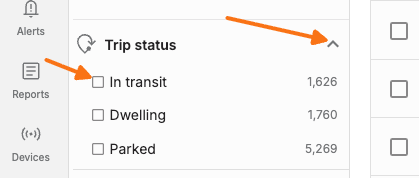
Save a filter set
Configure the filters you want to save in the Filters panel.
Click the Filter options ("...") menu in the Filters panel header.
Select Save selected filters.
In the "Name your filter set" dialog, enter a name in the Filter set name field.
Click Save.
Filter set names must have at least one character. Leaving the field blank and clicking Save shows the error "Filter sets must have a name with at least 1 character."
Apply a saved filter set
Open the Filters panel.
Expand the Saved filter sets accordion at the top of the panel.
Click the name of the filter set you want to apply. The filters update immediately to match the saved criteria.
View all saved filter sets
The Saved filter sets section at the top of the Filters panel lists your saved sets. When none exist yet, it shows "No saved filter sets" along with a prompt to save your current filters from the Filter options menu.
Rename a filter set
In the filter drawer, expand Saved filter sets.
Click the overflow menu (three-dot icon) next to the filter you want to rename.
Select Rename from the Filter set options menu.
Enter a new name in the Rename filter set dialog.
Click Save.
Delete a filter set
In the filter drawer, expand Saved filter sets.
Click the overflow menu (three-dot icon) next to the filter you want to delete.
Select Delete filter set from the menu.
Confirm the deletion when prompted with "Are you sure you want to delete this filter?"
Click Ok to confirm.
Who can see your saved filters
Personal filter sets are visible only to you. Each user's saved filters are stored separately and scoped to their account.