

Asset Summary Panel - Sharing Live Location
The Asset Summary Panel is made up of several sections that give you more detail on the selected asset. Which sections appear depends on the asset's type and sensor configuration, so you may not see all of them for every asset.
How to share
Select the asset to open its Asset Summary Panel.
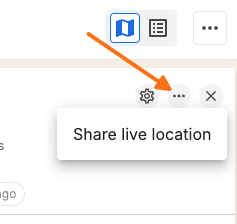
Click the "..." icon in the panel header.
Choose Share live location.
The recipient gets a link they can use to view the asset's real-time location without logging into Connect1.
Share live location is only available when the organization setting allows live location sharing, and your user group has the canShareLiveLocation permission.
Related articles
Was this helpful?
Was this helpful?